blog
Install the new Puma Scan Claude Skill to let AI agents scan C# projects with Puma Scan Server Edition CLI, triage findings, and fix vulnerabilities.
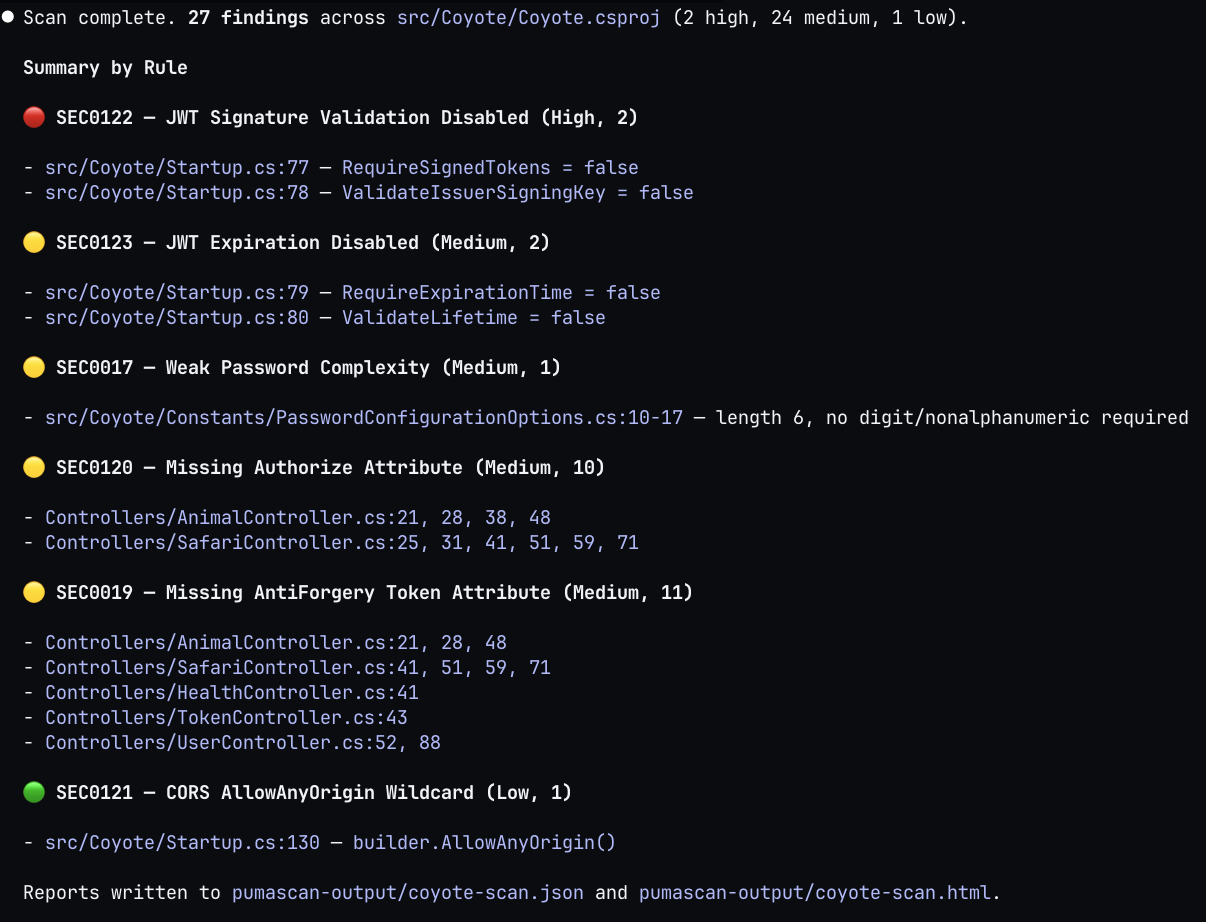
The new Puma Scan Claude Skill lets AI coding agents run the Puma Scan Server Edition CLI directly inside a Claude Code session. Using the pumascan skill, agents can now scan C# projects for security vulnerabilities, parse the findings, and help developers fix or suppress them without leaving the session. This post walks through what skills are, when to use a skill over an MCP server, and how to install and use the new pumasecurity/skills repository in your own environment.
To get started, check out the Claude Code Skills documentation and Anthropic Academy’s Introduction to Agent Skills training module.
Claude skills are small, markdown-based instructions that teach Claude how to perform a specific task. The SKILL.md file contains YAML front matter describing the skill’s name, purpose, and the tools it is allowed to use. When a prompt matches the skill’s description, Claude loads the file into its context and uses the instructions inside to execute the task.
Instead of re-explaining the same instructions in different conversations, Skills provide a way to re-use instructions for a specific tool, command line interface, or playbook. The agent reads it, understands the tool’s arguments, options, flags, output formats, and exit codes. Then, the agent executes the steps to run the tool in the correct order.
Skills can be stored locally or in version control for sharing across teams or even publicly. Creating your own skill requires writing a SKILL.md file, adding references (if needed), a Claude plugin marketplace template, and the underlying CLI tools to run.
Model Context Protocol (MCP) servers and Claude skills solve overlapping problems but in very different ways. MCP runs a long-lived process that exposes structured tools to the agent over Streamable HTTP using the JSON-RPC 2.0 message format. Skills are static Markdown files that describe how the agent should use tools it already installed locally.
For wrapping a command line interface, skills are usually the better fit:
pumascan binary through its normal Bash tool.Bash, Read, Grep, and Glob tools, which keeps the surface area small.MCP tools are still useful when you need stateful sessions, streaming results, or tools that genuinely cannot be expressed as a CLI invocation.
With an understanding of these options, integrating the Puma Scan Server Edition command line interface (CLI) with Claude Code is a perfect use case for a skill.
Writing the pumascan skill was actually simple because Claude is really good at writing skills. Using a series of prompts, we iteratively gave Claude the pumascan command line help text. As Claude learned about the CLI commands, arguments, expected inputs, and output, it wrote the information to the SKILL.md file. The SKILL.md file took roughly 30 minutes to create approximately 400 lines of Markdown, which is tiny compared to the work of building an MCP server.
After carefully reviewing the SKILL.md file for accuracy and completeness, I made a few manual adjustments to the content and structure. Then, I had Claude review its own work in a new session. Claude read through the SKILL.md file and recommended nine different clarifications to improve its understanding of the CLI.
To test the skill locally, simply copy the file to ~/.claude/skills/pumascan/SKILL.md and start a new Claude session. The following prompt triggers the skill to be loaded into context:

Using the instructions, Claude parses the project file and other command line arguments from the prompt, constructs the pumascan scan command, and executes it through the Bash tool. The skill also teaches Claude the JSON output format for summarizing the findings, walking through each issue, and suppressing false positives with the pumascan add-exception command.
We have published a new GitHub repository at pumasecurity/skills that hosts Puma Security’s official AI skills. The repository includes the Claude Code plugin marketplace configuration, which allows you to access every skill we publish under the pumasecurity namespace.
The first skill in the repo is pumascan, which wraps the Puma Scan Server Edition. The skill documents the version, scan, and add-exception commands, as well as the full .pumafile schema, expected exit codes, and an end-to-end agentic workflow for triaging findings.
Before installing the skill, make sure you have installed and licensed the underlying CLI:
pumascan uses MSBuild to load C# projectsIf you do not have a license yet, start a free trial through the Puma Scan Portal or review pricing options.
Inside Claude Code, run the two commands below to register the Puma Security marketplace and install the pumascan plugin:
/plugin marketplace add pumasecurity/skills
/plugin install pumascan@pumasecurity
That is the entire installation. Claude Code pulls the SKILL.md file from the repository, registers the pumascan skill, and loads it the next time the agent decides the skill is relevant to the user’s request.
Once installed, you can ask Claude to scan a project using a prompt: “Scan the MyApp solution for security vulnerabilities.” The agent recognizes the request, loads the pumascan skill, and invokes the CLI with the right arguments to scan the project. The agent then reads the JSON output and walks through findings with you one rule at a time. Each rule category (SEC0017, SEC0019, SEC0120, etc.) maps to the Puma Scan rules documentation, so the agent can leverage remediation guidance.
For each finding, the skill instructs the agent to ask whether you want to fix the issue or except it. When you choose to fix, the agent generates a code patch that follows the rule’s remediation pattern and applies it directly to the file.
After applying a batch of fixes, the agent re-runs pumascan scan to confirm the findings are resolved. The scan -> fix -> rescan loop is exactly what real-time security feedback looks like, just driven by a conversational interface instead of our traditional IDE warning squiggle.
As with all scanners, some findings will be false positives or accepted risks. The pumascan skill also knows how to invoke pumascan add-exception to suppress the finding in the project’s .pumafile:
pumascan add-exception \
  -p /path/to/src/MyApp.csproj \
  --diagnostics SEC0017 \
  --file-path src/MyApp/Constants/PasswordOptions.cs \
  --begin-line 10 \
  --end-line 20 \
  --reason "approved by security as an exception"
The skill records who approved the suppression with a reason, keeping your .pumafile as the auditable history of exceptions added to the codebase. Then, the agent re-runs the scan to confirm the finding is now suppressed and won’t show up in future scans.
Have an idea for another skill? Open an issue or pull request in the skills repository and let us know.
Do you need help integrating AI into your organizations workflows? We can help! Contact us at sales [at] pumasecurity [dot] io.
Eric Johnson’s experience includes performing cloud security architecture and design, cloud native and Kubernetes assessments, infrastructure as code automation, application security automation, web and mobile application penetration testing, secure development lifecycle consulting, and secure code review assessments.
